7 Ways to Help Elderly Parents Stay in Touch with Family
5 September 2026· Assistive Technology
7 Ways to Help Elderly Parents Stay in Touch with Family
If your parent keeps missing calls or avoids their phone, the fix is often simple: make the screen easier to use, keep family contacts in one place, and add a clear routine for calls and check-ins.
From what I see in the article, the main steps are plain and practical:
This matters because older adults are often hit hard by scam calls. In the UK, fraud reports affecting older people stay a serious issue year after year, and missed family contact can follow when someone stops answering unknown numbers. A simpler setup can help with both confidence and contact.
For me, the article’s core point is clear: you do not need to change everything at once. Start with the phone basics, keep the layout steady, and use tools like Ezefone to put calls, texts, WhatsApp and trusted contacts on one easy screen.
If you want the short version, here it is:
Step
What it does
One-tap calling
Makes family calls easier to start
Favourites screen
Cuts confusion from long contact lists
WhatsApp
Keeps photos, messages and calls close at hand
Larger text
Makes names and messages easier to read
Weekly routine
Builds a habit your parent can remember
Daily check-in
Gives family added peace of mind
Scam call controls
Helps stop stress from nuisance calls
In short, I’d sum the article up like this: make family contact simple, familiar and safe, so your parent can stay in touch with less help from you.
One tap to call or text
What Makes a Good Phone Setup for Older Parents
A good phone setup comes down to three things: simplicity, visibility and routine.
The first rule is simple: fewer taps. Keep calls, texts and WhatsApp on one clear screen, so finding family feels easy every time. When the basics are in one place, the phone feels less like a maze and more like a tool that helps.
Visibility matters just as much. Large text, clear contact names and a clean layout can cut down on hesitation. The next step should feel obvious at a glance, not hidden behind tiny icons or busy menus.
Then there’s predictability. A phone is much easier to use when the layout stays the same and gets used often. That sense of familiarity can make a big difference, especially for older parents who feel unsettled when screens shift around or settings change by accident.
Scam protection matters too. Nuisance calls can cause stress and make someone less likely to answer the phone at all, even when it’s family calling.
Ezefone is built around this kind of setup. It helps turn an Android phone into a simpler, clearer phone experience that feels easier to trust and use day to day.
Start with the simplest action: make calling family effortless.
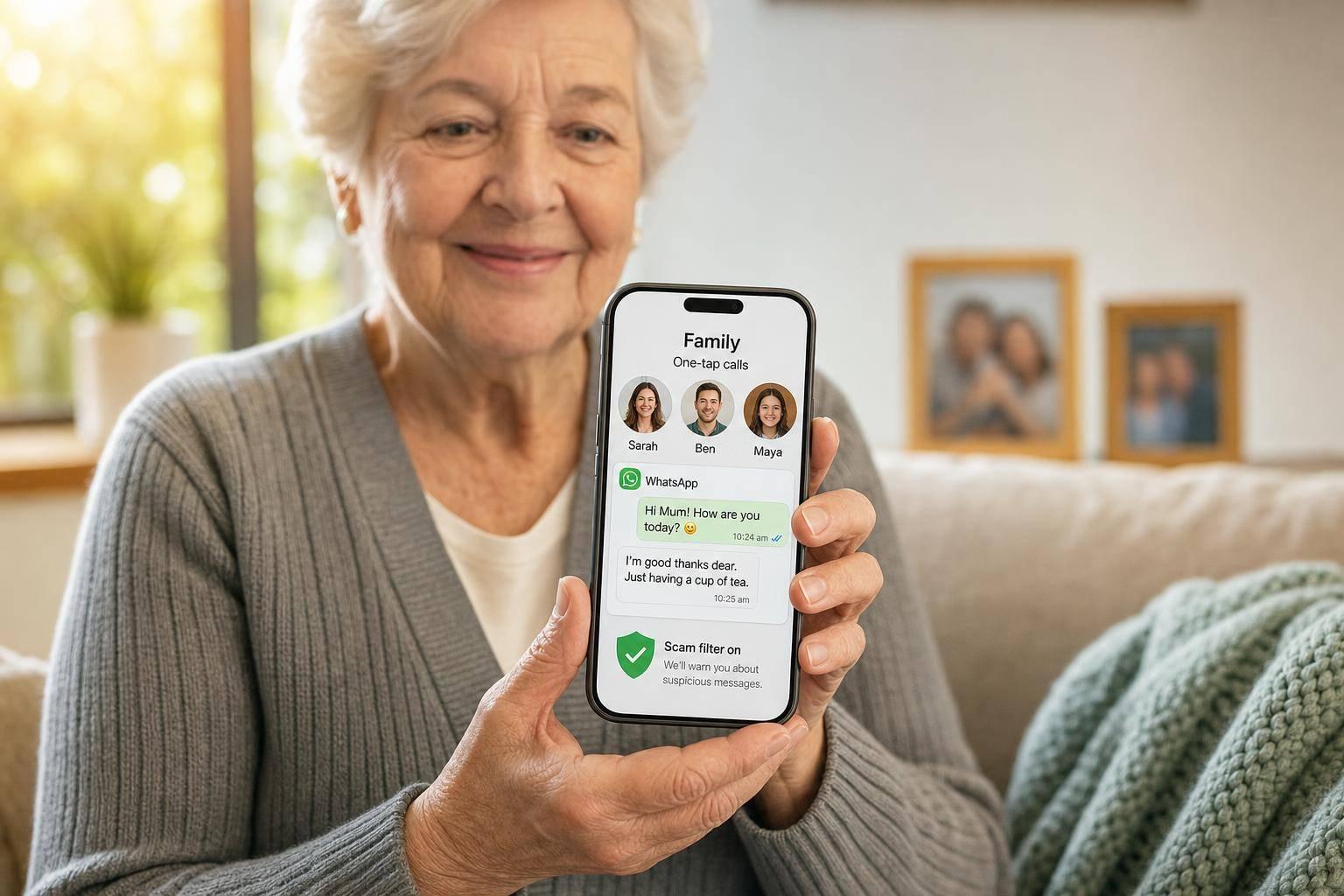
One-tap calling is the fastest fix, and for many families, it makes the biggest day-to-day difference. The hardest part is often just finding the right person to call. Ezefone places key family contacts on one clear screen, so they’re only one tap away.
You can set this up for your parent, then they can call, text, or message on WhatsApp without digging through menus. No hunting around. No second-guessing. Just one clear place to tap.
Once those family contacts are pinned in place, the phone feels much easier to use. It cuts out the searching, lowers that moment of hesitation, and helps parents reach family on their own when they need to.
2. Create a Favourites-Only Contact Screen
Scrolling through a long contact list just to call a son, daughter, or carer can wear anyone down. A shorter list takes that stress away.
Ezefone lets you pin the key people your parent calls most, so the main screen shows only the names that matter day to day.
That makes the phone feel calmer and more predictable. With fewer names on screen, there’s less confusion and fewer wrong taps. For a parent who gets flustered by a packed contact list, this small change can make the phone feel easy to use again.
3. Use WhatsApp for Simple Family Messages and Calls
WhatsApp can make it much easier for older parents to stay in touch. It handles messages, calls and photo sharing over Wi‑Fi or mobile data, so family contact feels simple and close at hand.
If the app looks too busy at first, don’t make it the only way they communicate. Keep WhatsApp alongside normal calls and texts, so family messages are still easy to find and open without changing too much at once.
As a carer, it helps to set things up in advance. Add only the family contacts they use most, and keep chats, photos and video calls easy to reach.
For everyday use, WhatsApp is especially good for short voice notes, quick photo sharing and video calls. Those small, regular moments can help someone feel connected to family without making the phone feel like hard work. It’s also wise to keep chats limited to known family contacts.
Once WhatsApp is easier to use, the next step is making the screen easier to read.
4. Turn On Larger Text and Accessibility Settings
If your parent struggles to read the screen, start with the basics: make the text larger, enlarge icons, and boost contrast. These small tweaks can make menus, messages, and contact names much easier to see and far less tiring to use.
That matters more than people think. When the screen is easier to read, it’s much simpler to keep up with family calls, texts, and day-to-day phone use.
If you want an even simpler setup, Ezefone can make an Android phone feel much less cluttered, with a cleaner layout that’s easier for seniors to use without digging through confusing menus.
5. Build a Weekly Photo and Video Call Routine
Pick a set day and time for family calls. That simple pattern takes away a lot of stress, because the routine does the remembering. Your parent doesn’t have to work out when to call or worry about missing the moment.
It helps to pair that call with a regular photo drop. Ask family to send photos at the same time each week, then link that to a short video call. Soon, the catch-up becomes part of the week instead of one more thing to figure out.
That steady rhythm matters more than most people expect. Repeating the same steps each week helps your parent feel more sure of themselves, and the phone starts to feel familiar instead of frustrating.
Ezefone keeps calls, messages, contacts and WhatsApp on one screen, so photos and video calls are easy to find.
That familiarity is where the comfort comes from. When the screen looks the same every time, your parent can build a habit and know exactly what to tap without stopping to think. Once that weekly routine feels normal, you can add a simple daily check-in and a fast way to call for help.
6. Add Daily Check-Ins and a Call for Help Shortcut
Regular contact should be simple, but it should also help in a moment of stress. Once regular calls are set up, add a daily check-in and a one-tap help shortcut so family contact works every day, not only on planned call evenings.
A daily check-in lets your parent tap once to confirm they’re alright. Family members then get an email alert. If a check-in is missed, it can give you an early warning that something may need a closer look. That kind of simple prompt can bring a lot of peace of mind without making the phone harder to use.
Ezefone also includes a Call for Help button. With one tap, your parent can connect to a chosen family contact. No searching through menus. No pressure to remember what to press.
Set the help contact and daily check-in in Ezefone, and you give your parent a simple safety net that still feels easy and calm to use. With daily contact and help set up, the next step is cutting down nuisance calls.
7. Cut Down on Nuisance Calls and Scam Stress
Scam calls can wear people down. After enough dodgy calls, many older parents stop answering the phone at all, even when the call might matter.
Ezefone helps by putting calls, texts, WhatsApp and contacts in one simple place. That cuts the mess on screen and makes odd or suspicious calls easier to spot. It can also silence nuisance calls, so carers can reduce unwanted interruptions from the start.
Call blocking helps, but a simple family plan matters too. If a call or message seems suspicious, your parent should not reply. Instead, they should use the family code word or contact you straight away on a trusted number.
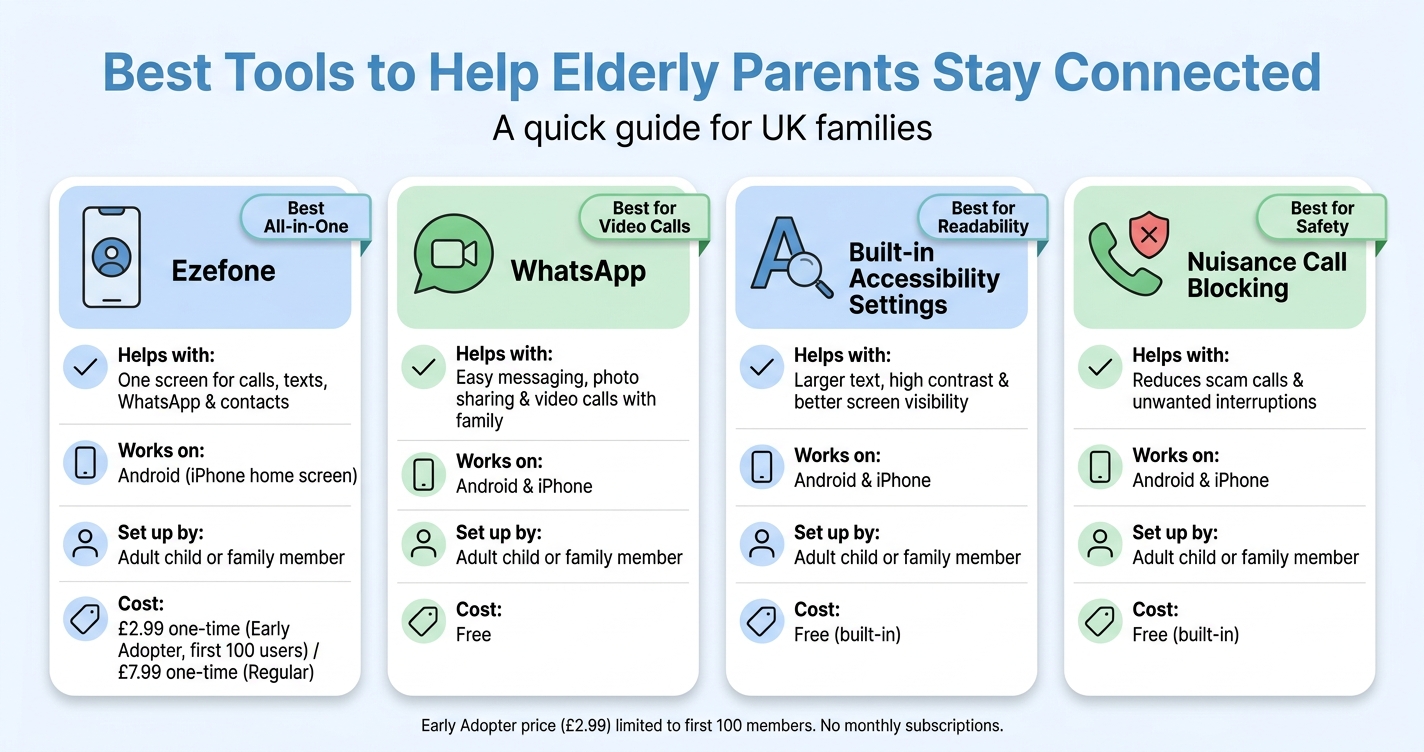
Quick Comparison Table for UK Families
Best Tools to Help Elderly Parents Stay Connected: Quick Comparison
If you need the fastest fix, this table makes it simple. It pulls the main options into one place, so you can see what may help your parent most without digging through every detail.
Option
What it helps with
Android or iPhone?
Set up by
Cost
Ezefone
One screen for calls, texts, WhatsApp and contacts
Easy messaging, photo sharing, and video calls with family
Both
Adult child or family member
Free
Built-in accessibility settings
Larger text, high contrast, and better visibility
Both
Adult child or family member
Free (built-in)
Nuisance call blocking
Reduces scam calls and unwanted interruptions
Both
Adult child or family member
Free (built-in)
Use this table to decide the first change to make. For some families, that will be easier calling and messaging. For others, it may be bigger text or fewer scam calls.
Conclusion
Keeping elderly parents connected doesn’t need a full tech overhaul. In most families, the setup that works best is also the simplest: one-tap contacts, WhatsApp, larger text, a weekly call routine, and scam-call protection. That mix helps families stay in touch with less stress.
Ezefone fits neatly into that kind of setup. It turns an Android phone into a simpler, safer screen for older users, so calls, texts and WhatsApp are easier to find and use without the usual clutter.
Start small. Make one or two changes first, then add more only when the basics feel easy. That keeps the phone simple enough for everyday use, instead of turning it into one more thing to figure out.
Once the phone feels familiar, family contact gets easier to keep up. One simple screen for calls, texts and WhatsApp cuts confusion and helps the phone feel safe to use.
The goal is simple: help parents stay in touch on their own. When it’s set up well, your parent can call or message family without needing help each time something goes wrong. And that confidence matters just as much as the tech.
Get started with Ezefone
Ezefone turns any Android phone into an easy, safe senior phone in less than 5 minutes. If you want less worry and more day-to-day peace of mind, now’s a good time to set it up.
Ezefone is a one-time purchase. Start free, or choose Standard at £7.99 or Family at £34.99. No monthly subscriptions, no hidden fees, and easy family setup.
Start simple, then build bit by bit. Ezefone can turn a busy Android phone into something much easier to use, with calling, texting, WhatsApp and contacts all in one clear screen.
The best approach is to add one tool at a time. Begin with something small, like a regular video call or a one-tap message, so your parent has time to get used to it and feel at ease before you add anything else.
Will this work if my parent already uses WhatsApp?
Yes. This can still help if your parent already uses WhatsApp.
The goal is simple: make everyday phone use easier without forcing them to learn something new. By improving access, adjusting accessibility settings, and making daily communication routines simpler, you can cut down stress and avoid those small tech problems that turn into big frustrations.
That means they can keep using familiar features with more confidence and a bit more independence.
How can I make their phone safer from scam calls?
Simplify their phone and cut down calls from unknown numbers. Use the phone’s built-in call settings so only saved contacts or known numbers ring through.
You can also switch on scam-call protection from their mobile provider or a trusted security app to help block suspected spam. This kind of simpler setup lowers the chance of accidental taps, call-backs, or chats with fraudsters.
For many families, this small change brings a lot of peace of mind. It also fits well with Ezefone, which makes an Android phone easier to use and less confusing for older parents.